
Explorador de código#
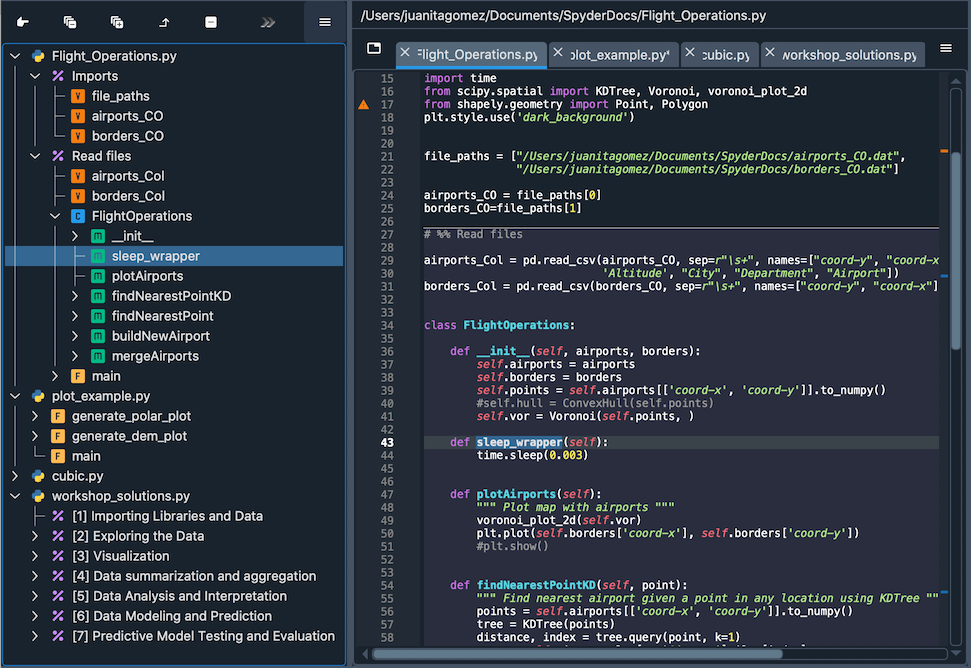
The Outline pane allows you to view and navigate the functions, classes, methods, cells and comments in open Python files. To show or hide the Outline pane, use or Ctrl-Shift-O / Cmd-Shift-O. Click an entry in the outline to jump to its source file location, and use the Go to cursor position toolbar button to highlight the item corresponding to the current Editor position. You can expand and collapse all or the current section, as well as restore the default tree layout, using the other toolbar buttons, which may be collapsed behind a … dropdown at narrower pane widths.
Menú de opciones#
El menú de opciones en la parte superior derecha del panel te permite personalizar la forma en que se muestra el explorador de código.
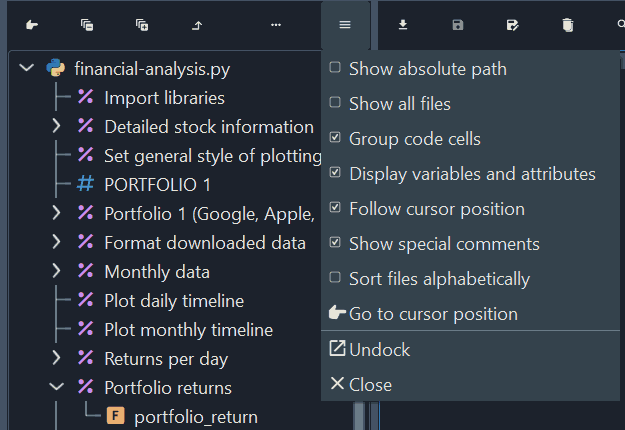
Estas opciones de personalización incluyen:
Mostrar la ruta completa: Muestra la ruta completa a cada archivo en lugar de solo el nombre.
Mostrar todos los archivos: lista cada archivo abierto en lugar de solo el actual. Esto permite usar el explorador de código como un selector de archivos.
Agrupar celdas: agrupa celdas de código anidadas en múltiples niveles en el explorador de código en lugar de mostrar todas las celdas en un solo nivel. Puedes crear subsecciones añadiendo más signos de
%al separador de celdas.Mostrar variables y atributos: muestra las definiciones de variable/constante de nivel superior y los atributos de clase en el explorador de código.
Follow cursor position: Automatically highlight and expand the entry corresponding to the current cursor position in the Editor.
Mostrar comentarios especiales: lista los comentarios especiales en el explorador de código, los cuales comienzan con
# ----.Organizar archivos alfabéticamente: ordena la lista de archivos en orden alfabético. Cuando se deshabilita, todas las pestañas se ordenarán según el orden de las pestañas del panel Editor seleccionado actualmente.
Iconos#
Los siguientes iconos se utilizan para elementos del explorador de código:
m para métodos
f para funciones
c para clases
% para celdas de código
# para comentarios