
Primera ayuda básica#
Estas sugerencias, si bien son más un enfoque de shotgun, tienden a arreglar la mayoría de los problemas informados por sí solos.
Pasos recomendados para la solución de problemas#
Reinicia Spyder, y prueba lo que estabas haciendo antes de nuevo.
Upgrade Spyder to the latest release, and you might find your issue is resolved (along with new features, enhancements, and other bug fixes). Bugfix releases come out every month or two, so unless you’ve updated recently, there is a good chance your version isn’t the latest. You can find out with the Check for updates command under the Help menu.
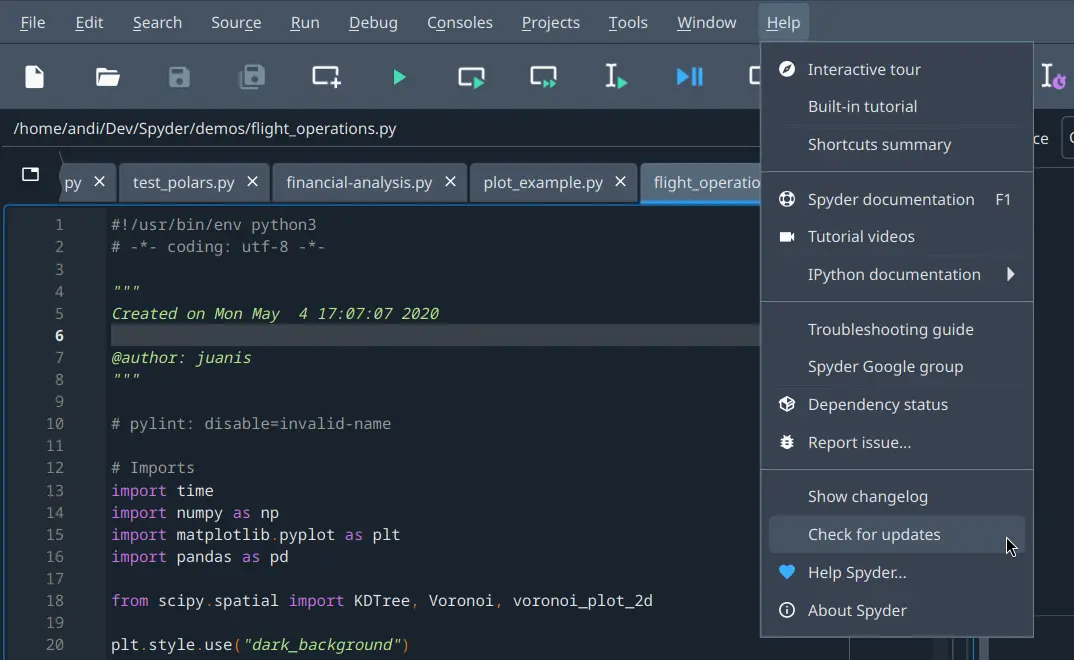
Recent versions of Spyder using our recommended Instaladores independientes will offer to automatically update themselves for you. If using an older version of Spyder or a non-standalone build (e.g. installed with Pip or Conda), we recommend downloading and running our latest Instaladores independientes.
To perform the update with Conda, see the FAQ P: ¿Cómo puedo actualizar Spyder utilizando conda?; to update with Pip use
pip install --ugprade spyder. If that still doesn’t work, we recommend updating Spyder’s dependencies and environment, either by installing the latest version of Anaconda/Miniconda/Miniforge, or with the relevant «update all» command in your terminal (or Anaconda Prompt on Windows).To get the latest stable version of everything using Conda, you can run:
conda update spyder qt pyqt spyder-kernels ipython ipykernel jupyter_client jupyter_core pyzmq
Or with Pip:
pip install --upgrade --upgrade-strategy "eager" spyder spyder-kernels ipython ipykernel jupyter_client jupyter_core pyzmq traitlets
Reinicie tu máquina, en caso de que el problema resida en un proceso de permanencia o de cualquier otro tipo.
Restaura los archivos de configuración de Spyder a sus valores predeterminados, lo que resuelve una gran variedad de problemas de Spyder. Desde tu terminal (o en el Anaconda Prompt en Windows), ejecuta:
spyder --resetNota
Esto restablecerá tus preferencias, así como cualquier atajo de teclado personalizado o esquemas de resaltado de sintaxis. Si te preocupa especialmente alguno de ellos, deberías hacer una copia de la carpeta
.spyder-py3en tu directorio de inicio de usuario (C:/Users/YOUR_USERNAMEen Windows,/Users/YOUR_USERNAMEen macOS, o/home/YOUR_USERNAMEen Linux), y restaurarlo después si esto no resuelve el problema.Try reinstalling Spyder via our Instaladores independientes (recommended), or in a fresh Conda/virtual environment, and see if the issue reoccurs.
If using Conda to install Spyder (only recommended for advanced users needing plugin support), in your system terminal (or Anaconda Prompt on Windows), run the following commands to create a clean environment and start Spyder in it:
conda create -y -n spyder-env spyder numpy scipy pandas matplotlib cython sympy
conda activate spyder-env
spyder
Si esto soluciona el problema es porque probable el problema se deba a otro paquete instalado en tu sistema, especialmente si se hace con pip que puede causar muchos problemas y debe evitarse si es posible.
Mira nuestro vídeo para resolver y evitar problemas con pip, Conda y Conda-Forge, y sigue sus instrucciones.
Reinstalar Spyder#
Si ninguno de los pasos anteriores resuelve tu problema, deberías hacer una desinstalación completa de Spyder por el mismo medio que lo hayas instalado originalmente.
For Spyder’s standalone installers, the uninstall mechanism varies depending on your operating system. On Windows, it can be removed via the entry under Add or remove programs.
For Anaconda/Miniconda, follow all the steps under Anaconda uninstall guide/Miniconda uninstall guide.
For Miniforge, follow the Miniforge uninstall instructions on macOS/Linux or remove it from Add or remove programs on Windows.
Then, delete the Anaconda/Miniconda/Miniforge directory wherever it was originally installed, and (on Windows) remove the %AppData%/Python directory if it exists.
Finally, do a clean install of the latest version of our Instaladores independientes, which is how we recommend you install Spyder and keep it up to date.
Importante
While you are welcome to get Spyder working on your own by one of the many other means we offer, we are only normally able to provide individual support for user-specific install issues related to our Instaladores independientes. In particular, managing your own installation via Conda or Pip can be easy to break, as there are many pitfalls involved and different issues specific to your setup, which is why we recommend using our standalone installers whenever possible. For further information, please visit our Guía de instalación.
Aislar problemas#
Si obtienes un error al ejecutar una línea, bloque o programa específico, puede que no sea un problema con Spyder, sino más bien algo más bajo en los paquetes de los que depende. Intenta ejecutarlo de la siguiente manera en orden hasta que comience a funcionar como esperas. Si logras aislar el error, repórtarlo al último en el que no funciona.
¡Spyder mismo, por supuesto! Asegúrate de que puedas reproducir el error después de cerrarlo y reabrirlo, si es posible.
A bare QtConsole instance, e.g. launched from the system terminal (Anaconda Prompt, on Windows) with
jupyter qtconsole.QtConsole is the GUI console backend Spyder depends on to run its code, so most issues involving Spyder’s Terminal de IPython usually have something to do with QtConsole instead, and can be reported to the QtConsole issue tracker.
An IPython command line shell, launched with e.g.
ipythonfrom system terminal (Anaconda Prompt, on Windows). Reproducible bugs can be reported to the IPython issue tracker, though make sure to read their guidelines and docs first.A standard Python interpreter, either run as a script file with
python path/to/your/file.pyor launched interactively withpythonfrom your system terminal (Anaconda Prompt, on Windows). While it is not impossible that you’ve found a Python bug, it is much more likely to be an issue with the code itself or a package you are using, so your best sources are the Python docs and the other resources listed above.
Truco
Si el problema se reproduce de forma similar o idéntica con cualquiera de estos métodos (aparte de Spyder en sí), entonces casi con toda seguridad no es un problema con Spyder, y sería mejor manejarlo en otros lugares. Como normalmente no somos capaces de hacer mucho sobre problemas no relacionados con Spyder, un foro como Stack Overflow o la documentación de paquetes relevantes son lugares mucho más apropiados para obtener ayuda o reportar el problema.
See the Pedir ayuda section for other places to look for information and assistance.
Depuración y ajuste del código de Spyder#
Si conoces Python, a menudo puedes diagnosticar e incluso solucionar los problemas de Spyder tú mismo, ya que la IDE está escrita en el mismo idioma que utilizas en él. Puedes explorar los mensajes de error que estás recibiendo y el funcionamiento interno de Spyder con la Terminal interna, disponible bajo el menú .
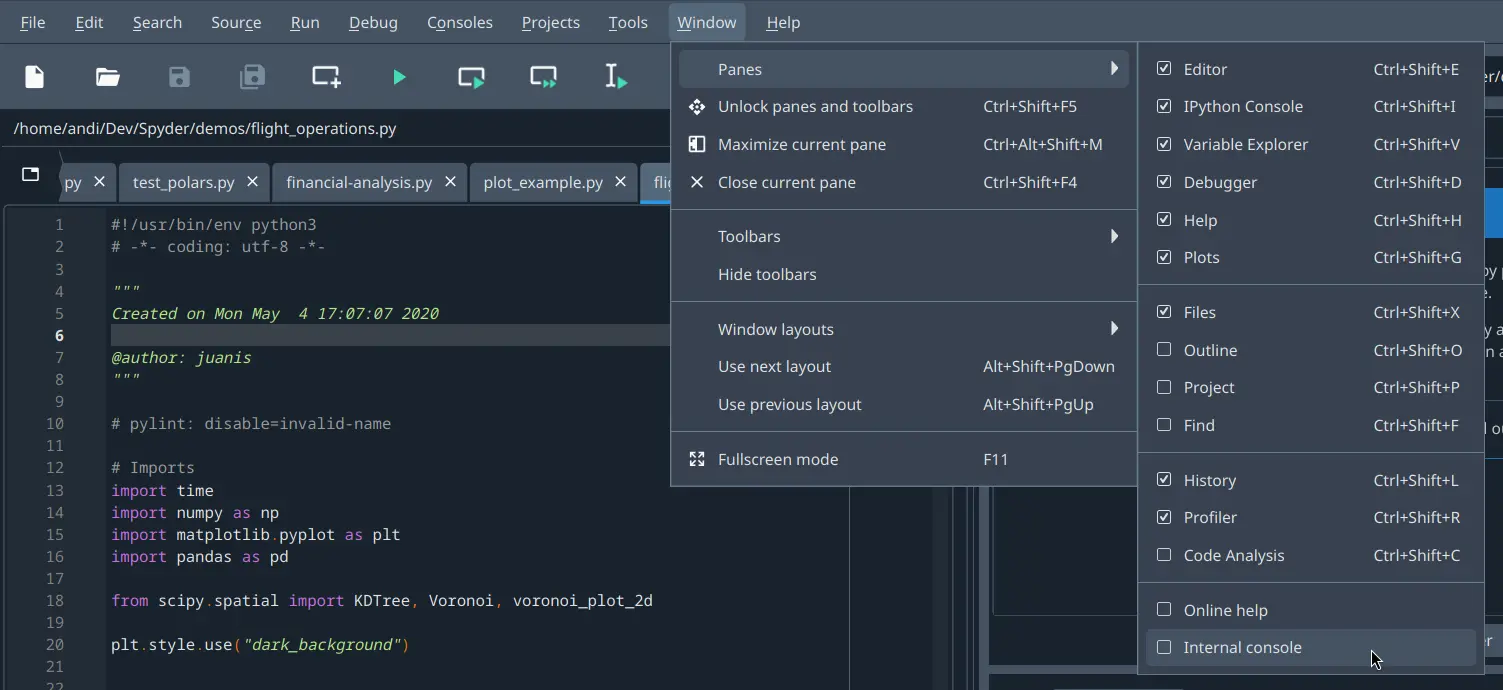
Para obtener una salida de depuración más detallada, inicia Spyder desde la línea de comandos (Anaconda Prompt en Windows) con spyder --debug-info verbose.
Incluso si no logras solucionar el problema por ti mismo, esta salida puede ser muy útil para ayudarnos a reducir rápidamente y resolver tu problema por ti.